
Blog
Coinomi Wallet Recovery: Seed, Password & Zero Balance

In short
Coinomi recovery starts by separating the app password from the recovery phrase. The password protects one installation; the phrase restores its wallets on another device. If you enabled an additional BIP-39 passphrase, that exact value is also needed.
- A rejected phrase calls for checking the words, their order and the original language. A valid checksum does not prove it is the right wallet.
- An accepted phrase with missing balances calls for checking the selected wallet, coins, token networks and derivation paths.
- If the phrase is missing, preserve the original installation. An accessible wallet may still let you display it. Coinomi support cannot retrieve your secrets from its servers.

Your Coinomi wallet won’t open, the app rejects the phrase, or the balance came back as zero after a restore. Most people who come to us with a Coinomi problem have one of three things in front of them: a seed phrase with a small error in it, a password that is gone, or coins that are on-chain but not showing. Each has a specific cause, and each is checked differently.
Coinomi is non-custodial: it keeps nothing of yours on its servers, and the seed phrase and private keys stay in your hands. The app can be locked with biometrics or a password, but that password protects only the copy on that device; with the recovery phrase you can restore access on a new device without it.
Coinomi doesn’t hold the coins either. They sit on the blockchain, and the app is the tool that reads and signs for them, which is why the same phrase also opens the funds in other BIP39-compatible wallets, subject to the derivation-path caveats further down.
How to Restore Your Coinomi Wallet
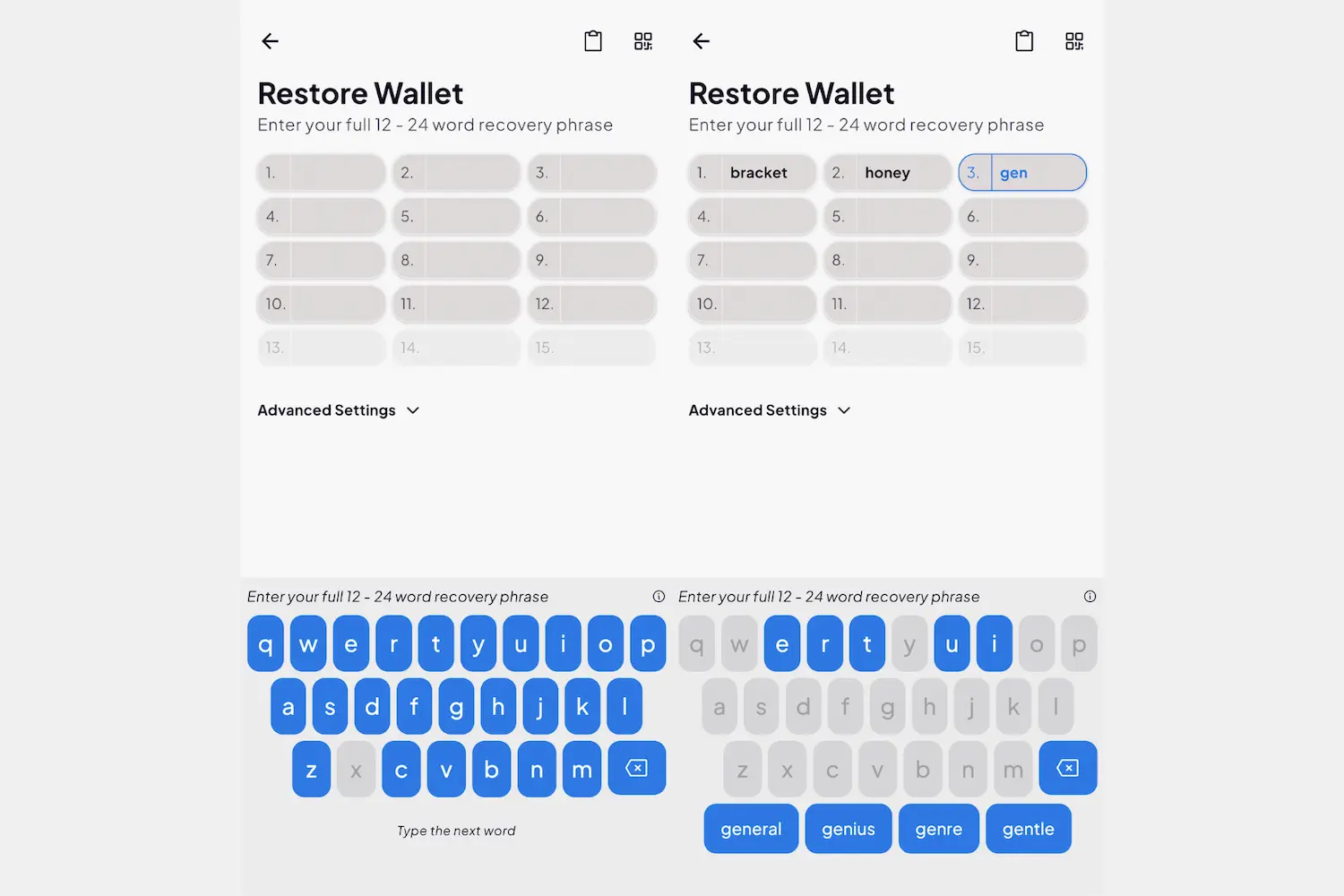
Recovery starts with the seed phrase. Coinomi generates a 24-word phrase by default and also restores 12- or 18-word phrases imported from other wallets; whatever the length, you need every word, in the original order. The steps are short. Where a restore fails, the phrase is usually the reason.
Here is what the process looks like:
- Open the Coinomi wallet app and choose “I already have a wallet.”
- Enter your recovery words in the correct order using the blue keyboard. This keyboard narrows down word options with each letter typed — a useful feature, since even a single incorrect letter will invalidate the entire phrase.
- After entering your words, press Continue once every word is in place: 12, 18, or 24 words, depending on how your phrase was originally generated.
- The app will prompt you to set up biometric authentication and select which coins to add.
- Once your coins are selected, the wallet should be accessible again.
For most people that is the whole job. If the app rejects the phrase, work through the next section before drawing any conclusions.
Invalid Coinomi Recovery Phrase?
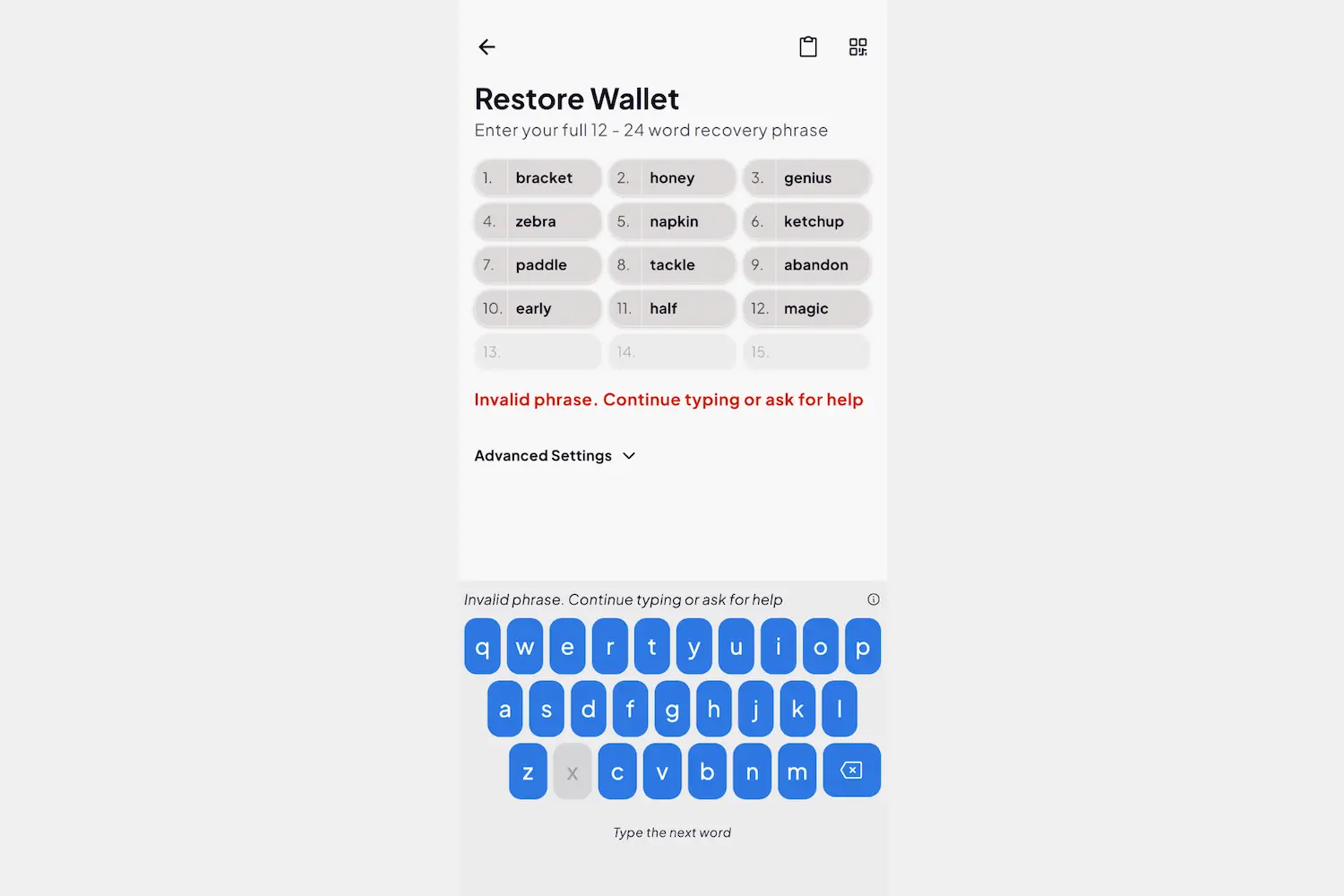
Coinomi uses the official BIP39 word list. A rejected phrase almost never means the funds are gone; it means something in the phrase is off, and it is usually something small.
Check the words first. Every word must be on the BIP39 list and spelled exactly: “hammer” for “hamster”, or a look-alike such as “game” for “gain”, fails the whole phrase. Then check the count: 12, 18 or 24 words, the length it had when it was generated, with nothing added or dropped.
Next, the order and the language. The words go in the order they were generated in; if you are unsure of it, work through the plausible orderings methodically and keep a note of each one you have tried. And if the phrase was generated in a language other than English, or written down translated later, restore it in that original language, which Coinomi supports.
BIP39 Checksum Validation
Every BIP-39 phrase includes a built-in error check. BIP-39 appends checksum bits to the original entropy and divides the combined bits into 11-bit word indexes. The final word therefore contains both entropy and checksum bits; it is not derived solely from a hash of the preceding words. A wrong final word will usually fail validation, but another candidate can pass the checksum while representing a different valid phrase. If you are comfortable with Python, you can verify your phrase with this snippet, but only on a machine that is permanently offline. Delete the file afterward. Your seed phrase should never touch a device with an internet connection.
from mnemonic import Mnemonic
m = Mnemonic('english')
print(m.check('word1 word2 word3 … word24')) # Returns True or False
Install the library with pip install mnemonic, run it with no internet connection, and it returns True for a structurally valid phrase or False if the checksum fails. That tells you whether the problem is in the phrase itself or somewhere else. If Python isn’t familiar territory, skip this step: a wrongly handled seed phrase is a far bigger risk than an unverified checksum.
Coinomi cannot help with an invalid phrase: as a non-custodial wallet it holds none of your data and has nothing to retrieve. If the wallet is still open on an existing device, though, you can read the phrase off that device: go to Settings → Manage Wallets, tap the three dots beside the default wallet, and select “Recovery Phrase.” The app asks for a face scan or PIN first.
Lost Coinomi Recovery Phrase
If the phrase is gone entirely and no usable local wallet data, accessible installation or other backup remains, there is nothing to work from, and no one can restore access: not Coinomi, not a recovery service. The arithmetic is the reason. Four missing words already give around 17.6 trillion candidates, and a full 24-word phrase encodes 256 bits of entropy (2^256 possibilities), beyond any brute-force approach with current hardware. With a partial phrase the picture changes, and we tell you at the assessment whether the remaining search is workable before any effort goes into it.
The practical step is a thorough search of every place the phrase might have been stored: old notebooks, safes, encrypted notes, cloud backups, anywhere you might have written it down in the weeks after setup. Take your time; these things do turn up.
Coins Are Not Showing Up After Wallet Restoration Issue
A missing balance after a restore is one of the more common situations we see, and it almost never means the funds are gone. Pre-2018 Coinomi wallets sometimes used non-standard derivation paths for certain coins, so the coins are there but the restored wallet is looking at the wrong addresses.
First check whether the coins have been added at all. Coinomi doesn’t add them automatically after a restore: work through the list with the + button and add each coin or token you held.
If the balance still doesn’t show, two more checks:
- A legacy Coinomi wallet may not update its derivation paths on its own. For coins such as BTC, LTC and DASH, you may need to update the Coinomi desktop app or set the path manually.
- You may be in the wrong wallet. Coinomi holds several wallets side by side, so a zero balance in one can mean the funds belong to a different seed phrase that hasn’t been imported yet.
Derivation Path Quick Reference
| Coin and address type | Coinomi path | Trust Wallet path | What to check when the balance shows zero |
|---|---|---|---|
| BTC, legacy addresses (start with 1) | m/44'/0'/0'/0/0 (BIP-44) | m/44'/0'/0'/0/0 | Add BTC with the + button after restoring, then open “…” → the account details to see the path, and switch the address type if the coins sit on legacy addresses |
| BTC, native SegWit addresses (start with bc1q) | m/84'/0'/0'/0/0 (BIP-84, Coinomi’s “default” type) | m/84'/0'/0'/0/0 | If this type shows zero, check the legacy and compatibility (BIP-49) address types of the same wallet |
| ETH and ERC-20 tokens | m/44'/60'/0'/0/0 | m/44'/60'/0'/0/0 | Add the token to the ETH wallet; a token Coinomi does not list can be added manually with its contract address |
| Tokens received on another EVM network (e.g. BNB Smart Chain) | Custom: paste the path shown in the account details of the ETH wallet | m/44'/60'/0'/0/0 | Add that network’s coin with the same path — the address is identical — then add the token on that network |
Forgot Password to Coinomi Wallet?
The password protects local Coinomi data. Some preserved Coinomi formats use scrypt with AES and can be assessed for a password search; the usable data, app version and device protection determine the route. This does not guarantee recovery. With the correct recovery phrase and any BIP-39 passphrase originally used, you can restore in a compatible wallet without the old local password.
If both the password and the recovery phrase are missing, preserved encrypted wallet data may still support an assessment. Without usable key material or a backup, there is no technical basis for recovery.
Failed to Restore Coinomi Into Another Wallet?
Coinomi follows the BIP39 seed standard, so the same phrase opens the funds in other compatible wallets. Compatibility stops at the derivation path, though: each wallet has its own defaults, and without the right path set the balance reads zero even when the funds are there.
MetaMask is the usual example. It shows the Ethereum network only until you add others, so if the phrase held BNB on BNB Smart Chain, MetaMask reads zero until that network is added in its network settings (the address is the same on both chains, because both use m/44'/60'/0'/0/0), or until you open the phrase in a wallet that lists BNB Smart Chain out of the box, such as Trust Wallet.
If you aren’t sure which path applies to your coins, or setting paths by hand feels unclear, stop there and get a second opinion before changing anything else.
Token Network Mismatch
A token on the wrong network is a common cause of a missing balance and has nothing to do with the seed phrase. Many tokens, USDT above all, exist on several networks at once: Ethereum, Tron, BSC and others. Add the token on the wrong network and the balance shows zero while the funds sit intact on the network they were actually sent to. Before concluding anything has gone wrong, confirm which network your tokens were sent or held on.
Still Cannot Get Your Funds? Reach Out to Professionals
If you have worked through the checks above and still can’t get in, what is left is usually one of three things: a partial seed phrase, an unusual derivation path, or a legacy-wallet quirk. Each can be assessed once the full picture is on the table.
Crypto Recovers has worked on cases like these since 2019: incomplete seed phrases, forgotten passwords, and missing balances after a restore. The assessment comes first and says what is recoverable and roughly how long it takes. Cases are reviewed in person or remotely, and we explain the approach before any recovery step is taken; the full process is on how it works.
FAQ: Coinomi wallet recovery
How do I back up my Coinomi recovery phrase?
Open the wallet settings and view your recovery phrase. Write down every word in the correct order and store it securely offline. Avoid saving the recovery phrase on the same device or in an unencrypted digital file.
What should I do if I lose my phone or get a new device?
Install Coinomi on your new device and choose the wallet restoration option. Enter your recovery phrase exactly as it was originally written to regain access to your cryptocurrency.
Why is my Coinomi wallet not showing my coins?
Your coins may not appear because they need to be added manually after restoring the wallet, or because the wrong derivation path or recovery phrase is being used.
Can I import a private key into Coinomi?
Yes. Coinomi supports importing private keys for certain cryptocurrencies. Importing a private key restores access only to that specific address, not to the entire wallet.
How long does Coinomi wallet recovery take?
The recovery time depends on the information available. Simple cases may be resolved within hours, while more complex recoveries involving missing words or forgotten passwords can take days or longer.
How much does Coinomi wallet recovery cost?
Crypto Recovers charges a success-based fee only after a successful recovery. There are no upfront costs, and if the wallet cannot be recovered, you do not pay a recovery fee.