
Blog
Green Wallet No Longer Works – How to Recover

Technical review: · checked against vendor documentation
In short
Recovering Blockstream Green depends on the original network and security type, not just entering a phrase that the app accepts. A Singlesig wallet and a 2FA-protected Multisig Shield wallet require different restoration routes.
Use the matching Blockstream app recovery flow for multisig; importing its words as an ordinary single-signature wallet can show an unrelated empty balance. Preserve any legacy password-protected backup and its password, plus an optional passphrase where used. Lost 2FA requires checking the account’s specific recovery conditions and timelocks, rather than assuming a universal waiting period. If the app still opens, verify the backup before reinstalling; a connection error or forgotten PIN does not justify erasing your only remaining copy.

You deleted the Green Wallet app or lost your phone. Your Bitcoin didn’t go anywhere — the funds are still on the blockchain, and the app was only the key, not the safe. Recovery means using the exact recovery phrase: usually 12 or 24 words, or 27 words for some legacy password-protected Green wallets.
One thing decides where you can restore it: your wallet type. A Multisig Shield wallet (the 2FA-protected default) restores only in the Blockstream app. A Singlesig wallet also restores in third-party wallets like Electrum or BlueWallet — its default account is Native SegWit on the m/84'/0'/0' derivation path. If part of the multisig setup is lost or fails, that’s when specialist help comes in.
How to Restore Blockstream Green Wallet — Restore From Seed
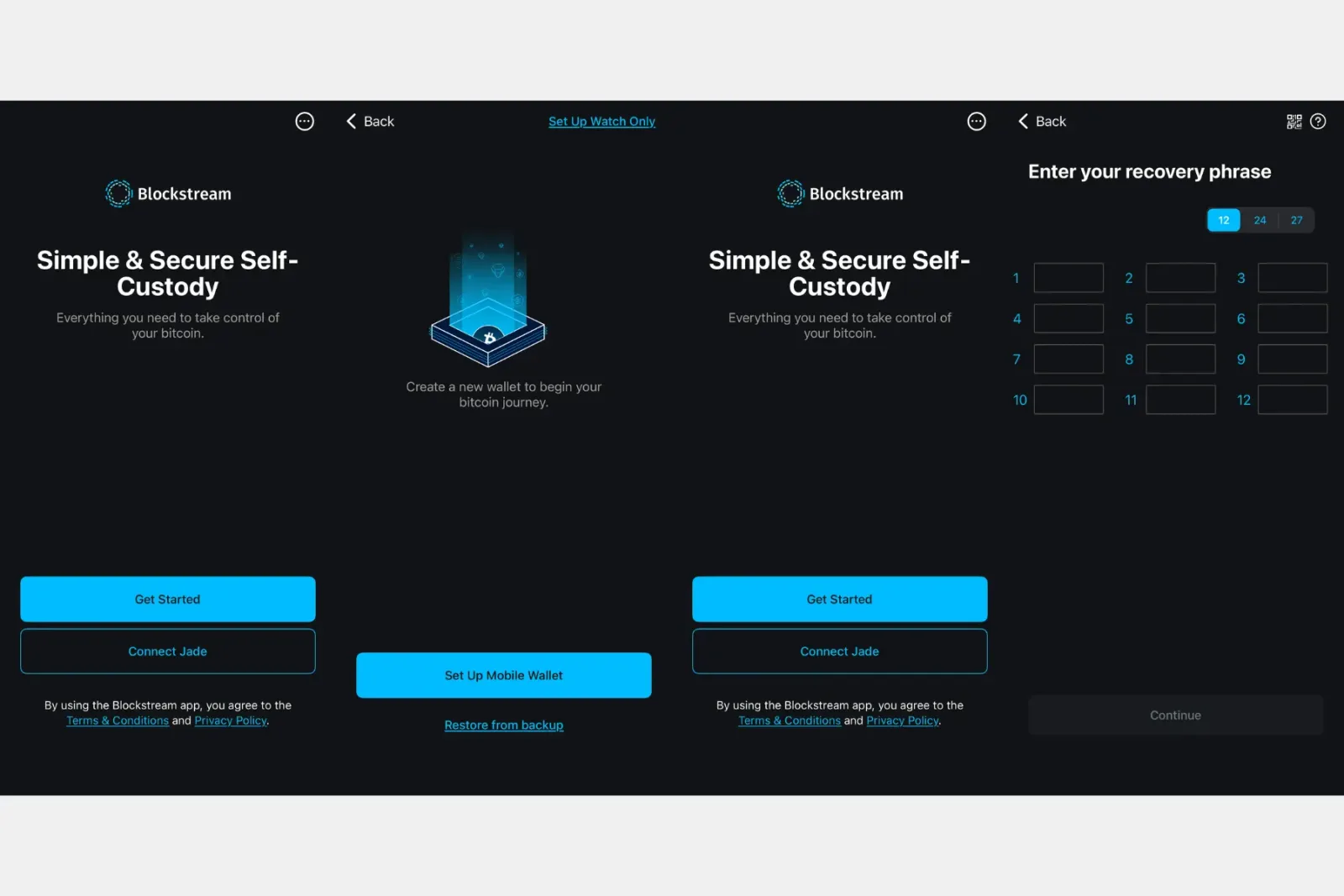
The recovery phrase you wrote down during setup is your key back in. Where you enter it follows from the wallet type above: a Multisig Shield wallet in the Blockstream app only, a Singlesig wallet there or in a third-party wallet (see the end of this section).
Before you start, make sure at least two backups of the phrase exist in separate offline locations. Metal plates are a popular choice because they are nearly indestructible; wherever the backup lives, it should be out of sight but findable when you need it.
To restore in the Blockstream app:
- Go to your Blockstream app and choose the “Get started” option.
- Then choose “Restore from a backup.”
- Enter the recovery phrase exactly as recorded. For a legacy 27-word phrase, enable the password-protected recovery option.
- Allow Face ID if the app offers it, then let the wallet finish syncing. The right phrase, restored with the matching network and security type, shows the expected balance once the sync completes.
Restoring in another Bitcoin wallet, such as Electrum or BlueWallet, only works for Singlesig wallets. A Multisig Shield wallet uses a security model that no third-party wallet understands. Electrum will accept the words, then build a brand-new, empty single-signature wallet — your coins stay untouched in the original multisig setup. Restore a Multisig Shield wallet in the Blockstream app only. For a Singlesig restore, set the derivation path manually if your balance doesn’t appear: Green’s default Singlesig account is Native SegWit on m/84'/0'/0', and older Legacy SegWit accounts use m/49'/0'/0'. You’ll find the setting in the third-party wallet’s advanced or account options.
Seed Phrase Recovery on Blockstream Green Wallet
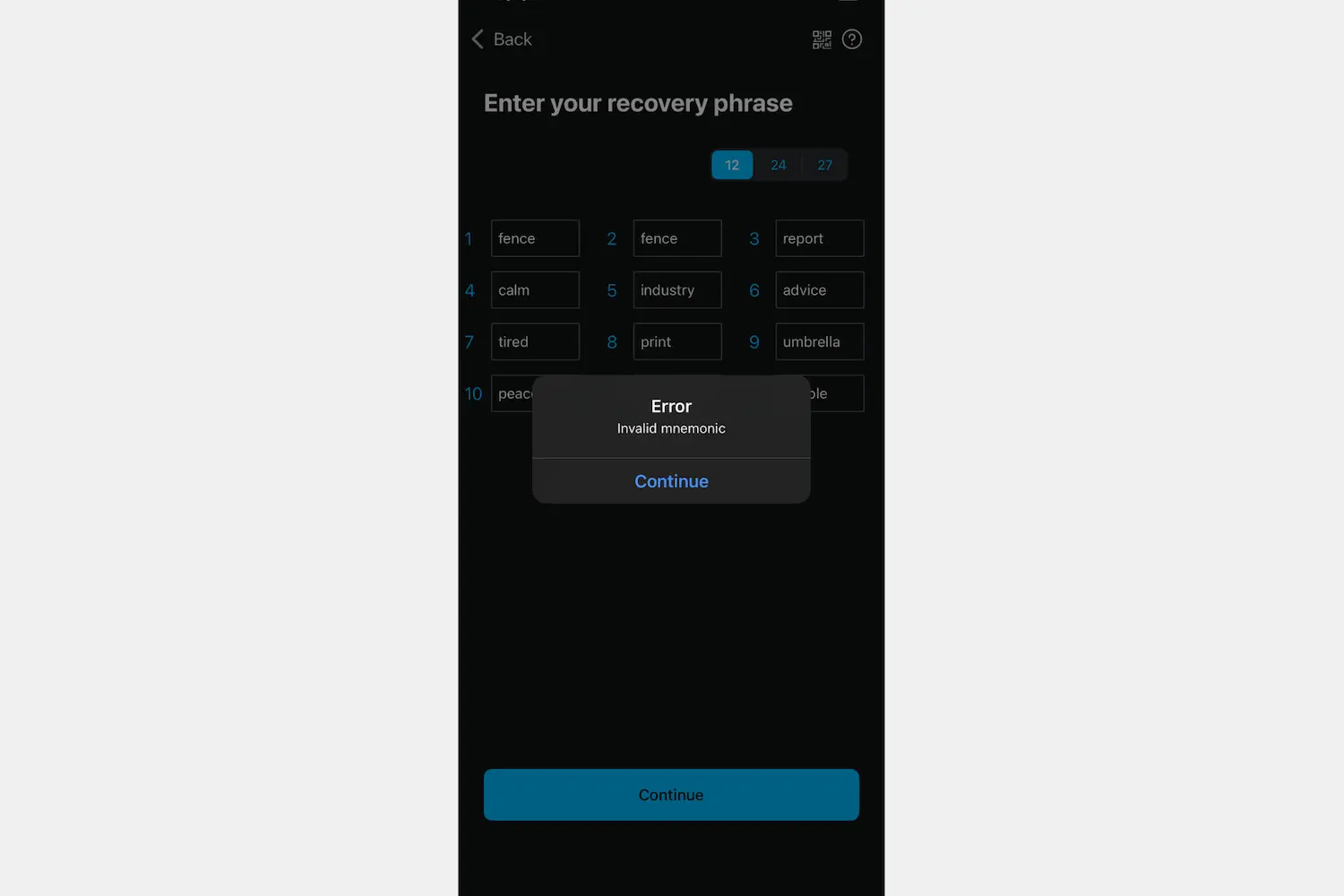
Feasibility depends on the phrase length, the number and positions of missing or uncertain words, the surviving words and any other reliable constraints. Each unknown position expands the search substantially, but there is no universal four-word cutoff. Candidate phrases must be checked safely against a known public wallet address.
Before doing anything else, start by verifying your words against the BIP39 word list — 2,048 simple English words intentionally designed to look different from each other. An interesting built-in safeguard: while the first three letters of some words may be the same, the fourth letter is always different, making mix-ups harder than you’d think.
If your seed phrase is coming up as invalid, there are a few common culprits worth checking first:
- Similar-looking words. This is the most frequent source of confusion. If your word starts with “abs”, for example, try both absent and absorb; you may have misread your own handwriting.
- A single wrong letter. Small differences matter. Advice and advise, or keep and keen, are easy to mix up when written by hand, and either one will cause the entire phrase to fail validation.
- Wrong word order. The words must be in the exact sequence in which they were given to you during wallet creation. If you were not paying close attention at the time, you may need additional computing tools to find the correct arrangement.
- Wrong word count. The backup must contain exactly 12, 24 or 27 words, and a 27-word phrase only validates with the password-protected recovery option enabled.
If you have worked through all of this and the phrase still won’t validate, what remains depends on how much of it is certain. Partial letters and a few unreadable words can be searched, as the case below shows; a phrase with nothing left to go on cannot.
Green Wallet Recovery Success Case
One of our clients came to us with a seed phrase he had written down four years prior. The handwriting had deteriorated so badly that even he could not decipher what he had originally written. We started by carefully mapping every letter that could be identified with any confidence, built out all plausible word combinations from those partial characters, and after a month of brute-forcing the three words that were completely illegible, our tools successfully reconstructed the full seed phrase and restored access to his wallet.
Crypto Recovers specializes in this kind of restoration and uses custom tooling built for these cases, running on always air-gapped machines. Your phrase never touches the internet, which also means there is nothing for a phishing site to steal.
What if You Lost Your Seed Completely on Green Wallet?
If you have lost the complete recovery phrase and have no backup anywhere, your bitcoins will be locked on the blockchain forever. No technical expertise can reconstruct a recovery phrase from nothing.
However, if you still have access to your wallet right now, you can still retrieve and back up your phrase. Go to Security, then choose Manual backup → Back up recovery phrase. After completing Face ID verification, you will see your recovery words or a QR code that you can scan to retrieve them. Request a confidential assessment when you are ready.
Green Wallet Multisig Issues
To spend from a 2FA-protected Green wallet, you need the exact recovery phrase and Blockstream’s key through 2FA authentication or the applicable timeout-recovery path. If the 2FA doesn’t work and a transaction is stuck pending, in most cases it is a temporary server issue or a poor internet connection. Try switching networks or give the app a little time to sync before doing anything else.
If the problem does not resolve after a reasonable wait, you can disable 2FA after a time delay and use your seed phrase to open the wallet in a new app. The coins stay in the original multisig setup throughout; the timelock date decides when your key alone can spend them, and the 2FA recovery section below explains how to check it.
To recover Blockstream Multisig, follow these steps:
- Choose Restore Wallet in the new Green Wallet app.
- Enter the recovery phrase exactly as recorded; use password-protected recovery for a legacy 27-word phrase.
- Manually set up the correct network — Bitcoin Mainnet, not Testnet.
- Complete 2FA verification if your device is available, or choose 2FA timeout recovery if it is lost.
- Wait for the wallet to fully sync with the network.
- Try sending small amounts to check if the wallet works.
If everything works, the recovery is complete. If it does not, the cause is usually technical — a wrong network, an incomplete phrase or a failed sync — and a specialist can determine which applies.
Green Wallet Connection Failed
If your Blockstream Green Wallet is not syncing, the usual causes are a temporary problem on Blockstream’s servers, an outdated app, or a firewall blocking the connection. If you have waited, updated the app and tried switching between Wi-Fi and mobile data with no improvement, the last resort is to restore the wallet from your recovery phrase in a freshly downloaded app. Do that only if you are sure of the phrase. If you are not, and the app still opens, back the phrase up from it first (Security → Manual backup → Back up recovery phrase) before you uninstall anything, and if it still looks doubtful have a specialist look at it before you rely on it.
Green Wallet 2FA Recovery
If you lose access to your 2FA because the phone was stolen or the number changed, the app has a built-in route for it: 2FA timeout recovery. When the 2FA does not work during a transaction, the app offers you this option. You will need the exact recovery phrase to confirm your authority over the coins, and then you will be asked to wait.
The wait is longer than most people expect. Green’s default timelock is 51,840 Bitcoin blocks — roughly 360 days — and it runs per deposit rather than per wallet, so every incoming payment starts its own clock. On Liquid it is 65,535 blocks, about 45 days. The delay is deliberate: it is exactly what lets you recover without Blockstream’s key, and it is a security feature, not a bug.
Before you settle in to wait, check the dates. A deposit already past its timelock can be spent today with your key alone — no 2FA, no Blockstream. That holds even if Blockstream’s servers were unavailable: for Multisig Shield wallets the open-source tool garecovery builds that transaction from your seed phrase.
Two details matter for older accounts. Green switched its timelock script from nLockTime to CheckSequenceVerify on 25 January 2021, and accounts predating that relied on emailed recovery transactions — so an old GreenAddress mailbox is worth searching. Since May 2025 no new 2FA-protected accounts can be created; existing ones still work, but a fresh install will not recreate one.
Contact Crypto Recovers if your seed phrase is invalid. We may try to find the missing words or verify it against the BIP39 word list using fast custom computing tools.
Wallet Shows Zero Balance After Recovery
A zero balance after recovery usually comes down to one of four things, and none of them mean your Bitcoin is gone:
- Wrong network. Green Wallet uses Mainnet as the default for real Bitcoin transactions, but on the desktop version only, you can accidentally switch to Testnet via Settings → Wallets. Testnet is purely for development purposes and has nothing to do with real funds. If your balance is showing zero and you know that cannot be right, go to Settings → Wallets on the desktop app — not the mobile app, which does not expose this toggle — and confirm you are on Bitcoin Mainnet.
- Wrong wallet type or derivation path. If you entered a Multisig Shield phrase into a third-party wallet like Electrum, that wallet built a fresh, empty single-signature wallet — your coins are still in the original multisig setup, untouched. Restore in the Blockstream app instead, using the same security type you set up originally. If you restored a Singlesig wallet and the balance is missing, set the derivation path manually in the third-party wallet’s advanced settings: m/84'/0'/0' for the default Native SegWit account, or m/49'/0'/0' if you created a Legacy SegWit account.
- Forgotten BIP39 passphrase. Sometimes called the “25th word.” If you set one up during wallet creation and have since forgotten it, the seed will restore a completely different, empty wallet — which looks exactly like a zero-balance error but is a missing passphrase problem.
- Wrong recovery phrase. A different valid Green recovery phrase opens a different wallet, which may show another balance or zero. Compare the backup with the wallet you are trying to access.
If you have worked through all four and still hit a dead end, reach out to Crypto Recovers. We can examine your case and give you an honest picture of your options without overpromising.
Forgot Your PIN on Green Wallet?
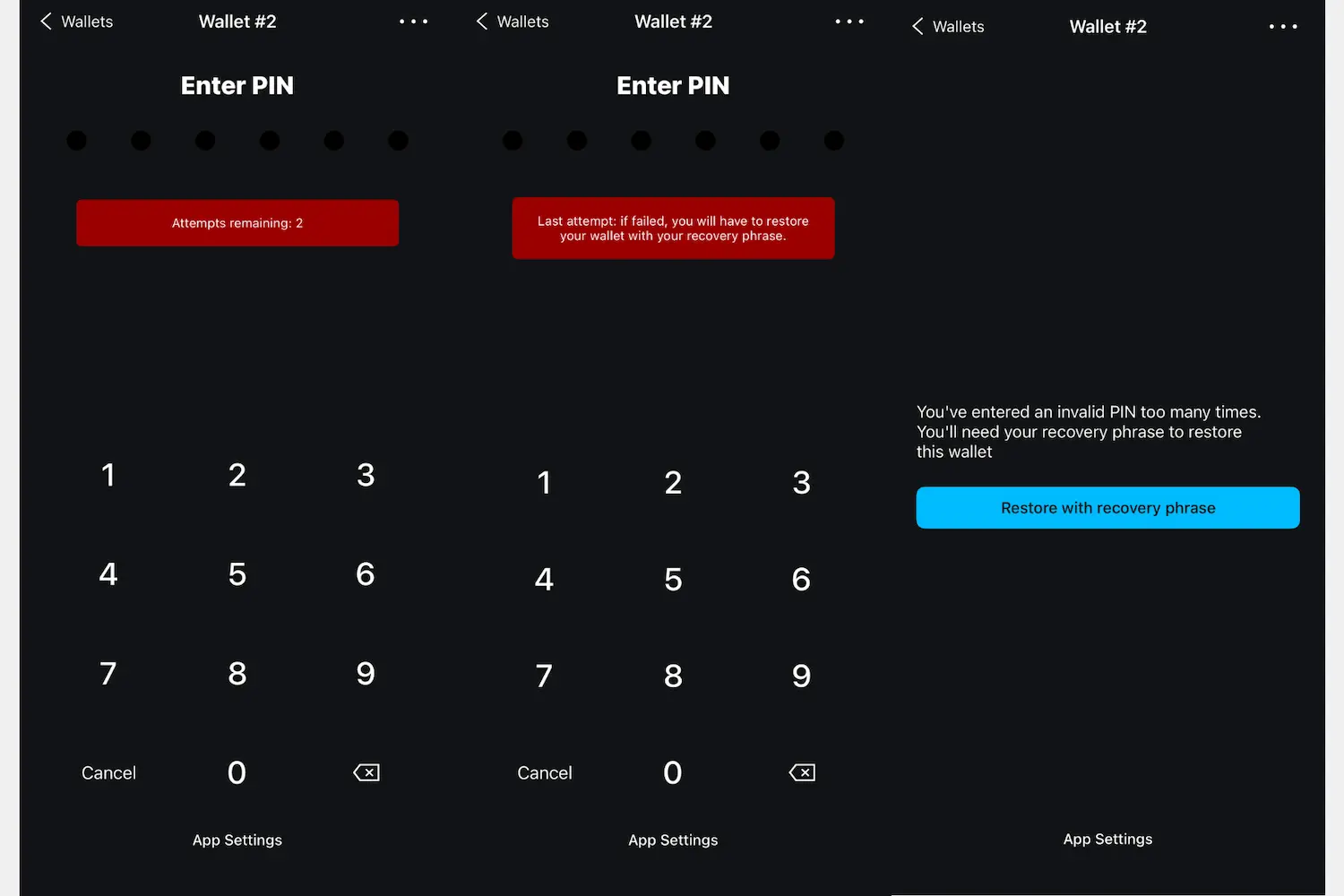
Green Wallet gives you three attempts to enter your PIN correctly.
If all three are wrong, you are locked out and the recovery phrase is the way back in: restore the wallet in a fresh install, as described above. If the phrase turns out to be invalid, go through the checks in the seed-phrase section; if the words still won’t validate, what is left is a systematic search for the correct ones.
Struggle to Get Your Bitcoins on Green Wallet? Contact Crypto Recovers for Help
The process is demanding, and in most cases there is still a realistic path forward. Whether you are trying to restore your Blockstream Green Wallet on a new device, dealing with a forgotten PIN, or finding out that your seed phrase is not quite right, Crypto Recovers has the expertise to help. We specialize in finding the correct seed phrase combinations and wallet passwords without interfering with the blockchain system.
We have been doing this since 2019 and have worked through many cases with patient, methodical work. A good specialist will tell you this upfront: we are not magicians. If your seed phrase is lost with no backup and no partial information, there is most likely nothing we or anyone else can do. But if you have partial words, illegible handwriting there is still a chance. Check out our reviews on Trustpilot, and visit our office by appointment for a straightforward conversation about the technical side of your case.
FAQ
Can I restore my Green Wallet in Electrum or BlueWallet?
Only if it was a Singlesig wallet. A Multisig Shield wallet — the 2FA-protected default — restores in the Blockstream app only: a third-party wallet accepts the words and then builds a brand-new, empty single-signature wallet, while your coins stay untouched in the original multisig setup. For a Singlesig restore, set the derivation path manually if the balance does not appear — m/84'/0'/0' for the default Native SegWit account, or m/49'/0'/0' for an older Legacy SegWit account.
Why does my Green recovery phrase have 27 words?
Current Blockstream App wallets usually use 12 or 24 words, but some legacy password-protected Green wallets use 27. A 27-word phrase has to be entered with the password-protected recovery option enabled, otherwise the app will not accept it.
How long is Green Wallet 2FA timeout recovery?
Green’s default timelock is 51,840 Bitcoin blocks — roughly 360 days — and it runs per deposit rather than per wallet, so every incoming payment starts its own clock. On Liquid it is 65,535 blocks, about 45 days. The delay is deliberate: it is exactly what lets you recover without Blockstream’s key. Check the dates before you settle in to wait, because a deposit already past its timelock can be spent today with your key alone.
What happens if I forget my PIN on Green Wallet?
Green Wallet gives you three attempts. After three wrong entries you are locked out of the app and have to fall back on your recovery phrase, which restores the wallet in a fresh install.
When is Green Wallet recovery impossible?
When nothing is left to work from: no recovery phrase, no backup, and no partial information. If the complete phrase is gone with no copy anywhere, the bitcoin stays locked on the blockchain, because no technical expertise can reconstruct a recovery phrase from nothing.