
Blog
Lost or Forgotten Ledger Passphrase: Recover Your Hidden Wallet

Technical review: · checked against vendor documentation
In short
A forgotten Ledger passphrase concerns the hidden accounts, not the Ledger Live password or the device PIN. Restoring the recovery phrase alone opens the base wallet. To recreate the hidden accounts, the original phrase must be combined with the exact passphrase.
- Check existing access before resetting anything, particularly if a passphrase was attached to a second PIN.
- Write down remembered words, capitalization, spaces and character patterns. These can narrow a candidate search; remembering something does not guarantee success.
- Compare receiving addresses with your own transaction records. An empty balance alone cannot confirm which passphrase is correct.
Ledger cannot reset a passphrase to recover the same accounts. Preserve the device and backups while the available recovery route is assessed.
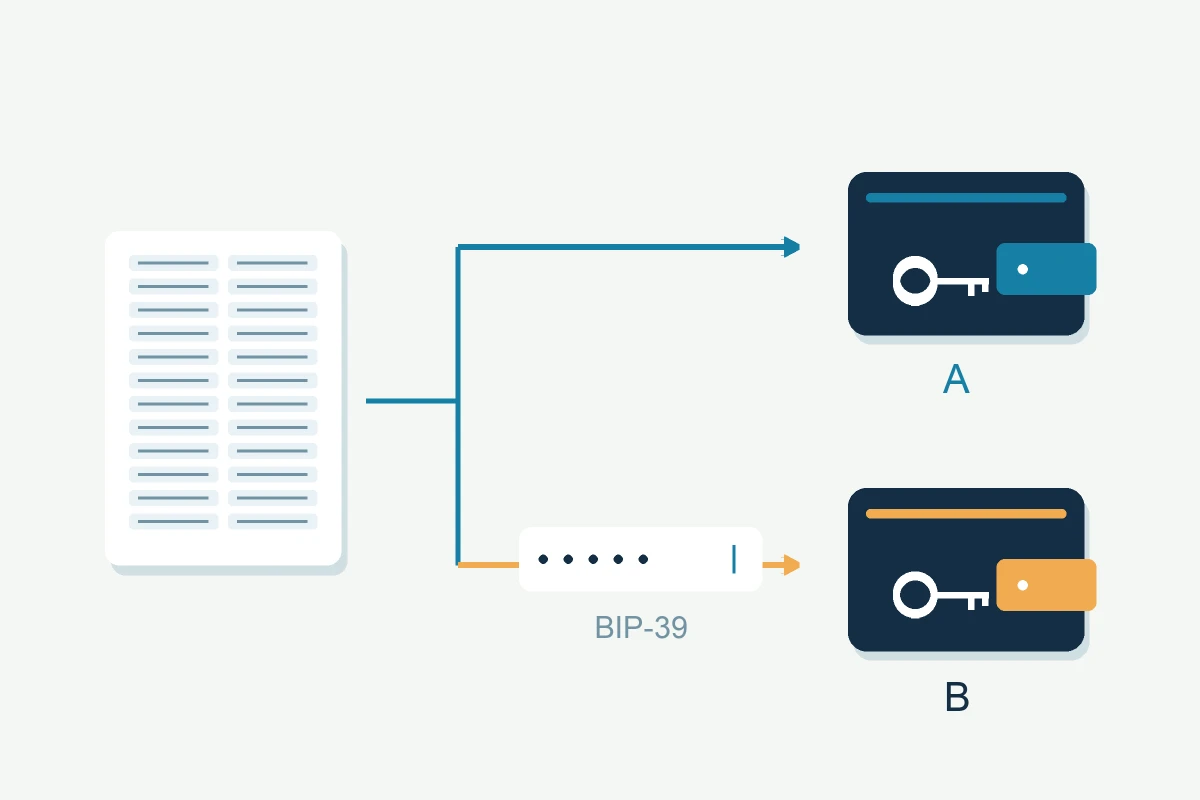
You set up a passphrase on your Ledger (the optional 25th word) and now you can’t remember it. The device opened, but you’re looking at an empty wallet that isn’t the one containing your funds. That’s the nature of this problem, and it’s worth understanding before you try anything else.
What a Ledger passphrase is and why forgetting it is serious
The BIP39 passphrase is an optional addition to your 24-word recovery phrase. Together, they generate a completely separate set of private keys. This is a hidden wallet that doesn’t exist anywhere without both pieces. It’s a powerful security feature: even someone with your 24 words can’t reach the hidden wallet without the passphrase. Ledger cannot reset the passphrase for you. However, if you attached it to a secondary PIN, that PIN may still open the hidden wallet on the configured device. Check that existing access before considering a search. Restoring the hidden wallet on another device requires the original recovery phrase and exact passphrase.
Why the device shows an empty wallet instead of an error
If you attach any passphrase to your 24-word phrase (including an incorrect one), Ledger generates a valid wallet. It just isn’t the one with your funds. The device doesn’t flag that the passphrase is wrong; it simply opens a different set of accounts. So if you’re entering your best guess and seeing a zero balance, that result doesn’t confirm the passphrase is wrong. It also doesn’t rule it out. You need to verify by checking the receiving addresses against your transaction history on a blockchain explorer: mempool.space for Bitcoin, etherscan.io for Ethereum. If those addresses don’t match what you’re seeing on the device, the passphrase is either wrong or entered differently than originally.
Start with what you remember
Before touching any software, write down everything you know about the passphrase. Not just guesses, but the patterns. Was it a word, a phrase, a mix of characters? Did you capitalise anything? Did you include numbers or symbols? Did you write it down anywhere separately from your seed phrase? Passphrases are case-sensitive and space-sensitive: ‘MyPassphrase’ and ‘mypassphrase’ generate entirely different wallets, as does ‘MyPassphrase ‘ with a trailing space. Variations like these are quick to test and worth ruling out before looking for other explanations.
When partial recovery is possible
A constrained search tests passphrase candidates against your 24 words and checks each resulting address against your own transaction history on a block explorer — the moment one candidate produces the address you recognise, the search is over. Length, character set, capitalisation and wording all narrow that candidate list; even a rough shape, such as "one word, capitalised, no numbers," turns an open-ended guess into a bounded one.
When recovery is not possible
A Ledger passphrase is a free-form string, not a phrase drawn from a fixed word list: unlike your 24 words, it carries no checksum and no built-in structure to narrow a blind guess. Submit a case to our Ledger wallet recovery service, and we'll tell you honestly whether what you remember is enough before you commit to anything.
The difference between passphrase and recovery phrase
These are two separate things that work together. Your 24-word recovery phrase restores your base wallet. These are the accounts that exist without a passphrase attached. The passphrase generates the hidden wallet on top. If you have your 24 words but not the passphrase, you can access the base wallet normally. The hidden wallet requires that passphrase again when restored from the words; a secondary PIN may still open it on an already configured device.
Protecting yourself going forward
If you recover the passphrase, write it down in a physically separate location from your seed phrase but with the same level of protection. And if your seed phrase is still on paper, consider upgrading both at the same time: metal backup products that survive fire, water, and physical damage are a small investment relative to what they protect.
FAQ: Ledger Passphrase Recovery
What is a Ledger passphrase, and why is it important?
A Ledger passphrase is an optional 25th word added to your standard 24-word recovery phrase. It creates a separate, hidden wallet on top of your normal one, so anyone who finds your 24 words still can't reach whatever you keep behind the passphrase.
How do I check my Ledger passphrase?
Ledger does not display the passphrase for you to read back. If you previously attached it to a secondary PIN, first check whether that PIN still opens the expected hidden wallet. Otherwise, enter a remembered candidate on the device and compare the resulting addresses with your transaction history, rather than relying on the balance alone.
Can I reset my Ledger passphrase?
No. A different passphrase derives a different wallet, so it cannot reset access to the original hidden wallet. A secondary PIN that you previously attached to the passphrase may still open it on the configured device. To restore it from a backup elsewhere, you need the original recovery phrase and exact passphrase. The recovery phrase without a passphrase opens the base wallet.
What should I do if I’ve lost my Ledger recovery phrase and passphrase?
First check for remaining device access, including a configured secondary PIN, and any usable backup or partial information. If none remains, the recovery phrase cannot be rebuilt from nothing. If you still have the 24 words and only the passphrase is missing, that's a different case — the base wallet opens normally with the recovery phrase, and the passphrase itself is the case described above, under “When partial recovery is possible.”
How to add a passphrase to Ledger Nano S?
To add a passphrase on Ledger Nano S, open Settings → Security → Passphrase on the device itself, choose “Attach to PIN” or “Temporary”, and enter your custom passphrase directly on the device. This creates a hidden wallet tied to that specific passphrase, separate from the accounts your 24 words open on their own.
What’s the difference between a Ledger password and passphrase?
A Ledger password secures access to the Ledger Live app, while a passphrase (25th word) generates a distinct hidden wallet on the device. Losing the password limits access to the app; losing the passphrase can block access to the hidden wallet if no configured secondary PIN still works. Only the second is a wallet recovery problem, and it is the one this article is about.
How to recover a Ledger PIN?
Ledger does not provide a forgotten-PIN retrieval function. Before deliberately triggering a reset, verify that you have a usable backup for the accounts you need, including any required passphrase. Three consecutive wrong PIN entries reset the device, after which you can restore from that backup and choose a new PIN. Preserve the device if the backup is incomplete or uncertain.