
Blog
How to Restore Guarda Crypto Wallet & Troubleshoot Issues

In short
Guarda has several recovery routes: an encrypted backup with its original password, a recovery phrase for the wallets derived from it, or an exported private key for the corresponding wallet. Its 12-word phrase covers most derived wallets, but some standards use a separate phrase.
Keep every backup version. An older file may use an older password and omit wallets added later. Changing the app password does not decrypt that older file. If a password is partly remembered, a search against a backup copy may be assessable; a damaged file needs a different check. Guarda cannot reset these secrets, so inventory the surviving files, phrases, keys and accessible installations before ruling recovery out.
Lost access to your Guarda wallet? What gets you back in depends on what you still hold: the encrypted backup file (.txt or .json) with its password, the 12-word recovery phrase, or a private key you exported for one coin. Guarda keeps no copy of any of them and cannot reset a lost password.
What Guarda recovery depends on
- The encrypted backup file (.txt or .json) is the primary route back in, protected by the password set when it was created.
- Guarda generates a 12-word recovery phrase that restores most wallets created from it. Wallets using a different standard may have a separate phrase of 18 or 24 words. An exported private key restores only its corresponding wallet.
- The encrypted backup requires the password used to encrypt it. Setting a new app password does not decrypt an existing backup; Guarda cannot reset the missing password.
When you first create a wallet, you’re prompted to download an encrypted backup file. This file contains all the private keys and addresses for your wallet.
Whenever you add or remove assets, you must redownload the updated backup file. The wallet notifies you with a red dot as a reminder. You’ll also be asked to create a strong password to encrypt the file.
Guarda is a multi-asset wallet: Bitcoin, Ethereum, XRP, Litecoin and ERC-20 tokens all sit in the same app, under the same backup.
How to Restore Guarda Wallet
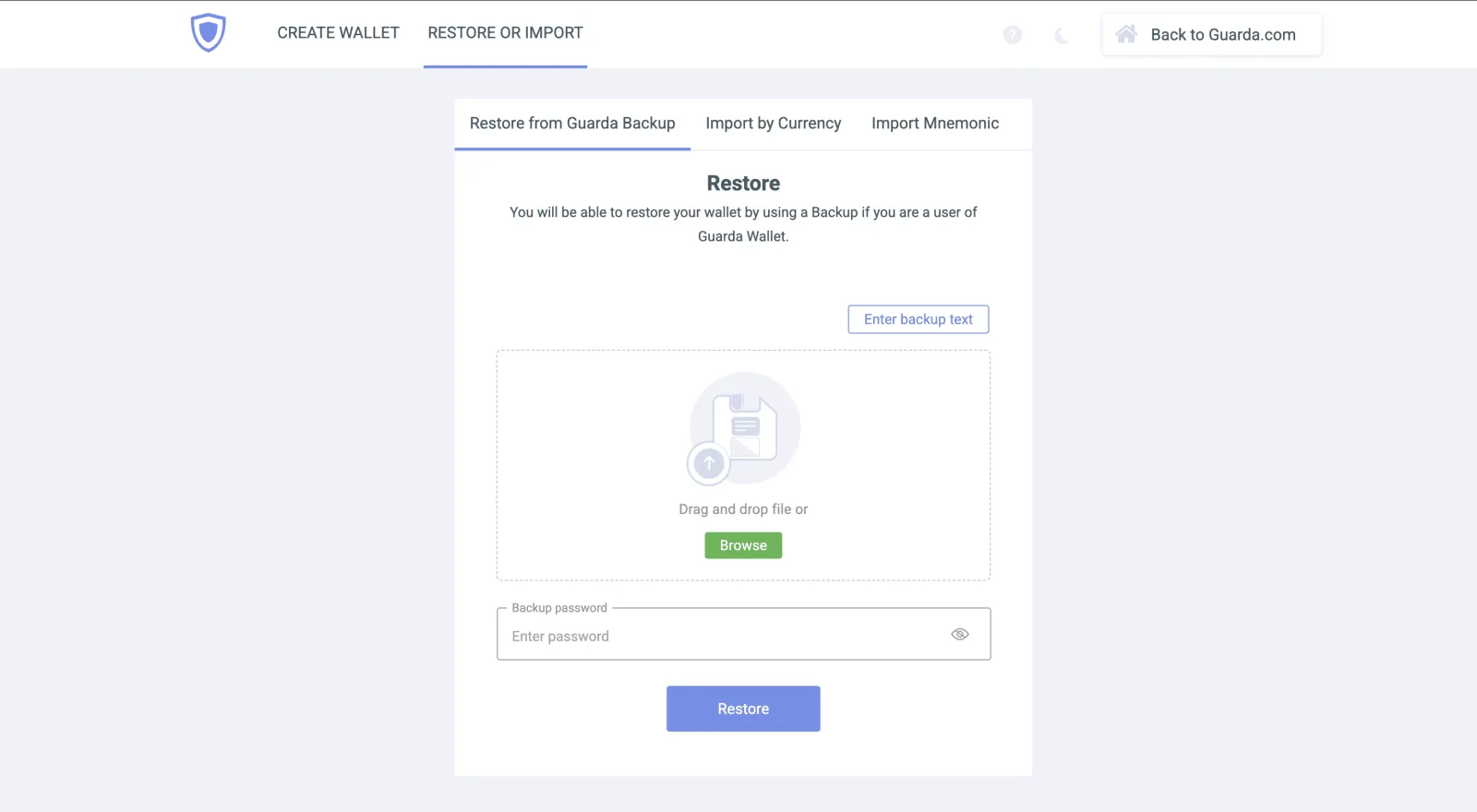
Guarda crypto wallet restoration works a bit differently on mobile devices compared to the desktop app, but the easiest way to restore your wallet is by using the .txt backup file. This file is most likely on the device where you originally created the wallet. Always keep an untouched copy of your backup file before restoring the wallet.
Follow these steps to restore your wallet:
- Reinstall or open the Guarda Wallet app on your device.
- Click on “Restore” or “Import Wallet.”
- Upload your backup file.
- Enter your password to decrypt it.
- Your wallet will be restored, including balances, addresses, and transaction history.
If the wallet doesn’t restore, the file, the password or the phrase is wrong or missing. Which one, and what else you still hold, decides what comes next.
What if you’ve lost the password, the backup file, or both?
If the backup, recovery phrase, exported private keys and all accessible wallet data are gone, there is no recovery material left. Losing the backup and password alone does not rule out recovery through a retained phrase, private key or accessible wallet.
The picture changes if something survived, so go through what you still have before you conclude anything.
- A backup file, with a password you partly remember. This is the best position on the list. Rule out the simple causes first: caps lock, a keyboard layout that switched languages, a typo. If the password still fails, the file sits on your own disk, so candidates can be tested against a copy offline at machine speed instead of typed into the app one at a time: length, the words or numbers you leaned on, capitalization, the symbol you added at the end when some site insisted on one.
- Several backup files and no idea which one is current. Guarda rewrites the backup whenever you create, import or delete a wallet, or change the password, so old copies pile up. Import them one at a time; an older file still opens the wallets that existed when it was written.
- A recovery phrase Guarda rejects. Check the words and their order first; our guide to invalid mnemonic phrases covers the usual misreads. One wrong word, two words swapped, a word missing — each of those is a constraint, and constraints are what make a search finite.
- Private keys you exported for individual coins. Each key restores one wallet, and Guarda’s own advice is to create a fresh wallet and import them back.
- A backup file that won’t open at all. Guarda backups are .txt or .json files holding the encrypted keys; a truncated download, a file that was edited by hand, or one damaged on a failing drive is worth examining before it is written off. A corrupted file is not the same thing as a lost key.
If none of those survived, there is nothing left to work from, and we would say so at the free assessment rather than leave you hoping otherwise. If something did, the free assessment is where to start, and how it works describes what happens after that.
FAQ: Guarda Wallet Restore
How do I restore my Guarda Wallet?
For backup restoration, open the official Guarda app or web interface, choose the backup restoration option and select your backup file. Enter the password used to encrypt that file. Alternatively, a retained recovery phrase can restore the wallets derived from it, or a private key can restore one wallet.
I forgot my Guarda Wallet password, how can I recover it?
The password is the encryption key for the backup file, so neither Guarda nor anyone else can decrypt it without the exact password. What can still work is a search: if you remember the general shape of the password — length, the words or numbers you tended to use, whether it was capitalized — candidates can be tested systematically against a copy of the backup file.
Can I restore my Guarda Wallet on a different device?
On another device, the backup route requires your encrypted backup and its password. A retained recovery phrase can restore the wallets derived from it; an exported private key can restore its corresponding wallet.
What should I do if I’m having trouble restoring my Guarda Wallet?
Check that the backup file is intact and that you’re entering the exact password: a one-character typo is enough to block decryption. Questions about the app itself go to Guarda’s own support; a lost password or a damaged file is a recovery case, covered in the section above on a missing password or backup file.
Is it possible to recover my cryptocurrency if I lose access to my Guarda Wallet?
Yes, if one of three things survived: the encrypted backup with its password, the recovery phrase for the wallets derived from it, or an exported private key for a single wallet. A backup whose password you only partly remember is still a search target, and a backup file that won’t open is worth examining before you write it off. If the backup file, recovery phrase, exported keys and any accessible wallet data are all gone, the wallet cannot be recovered: Guarda holds no copy of them.